
On this page
Match Scoring
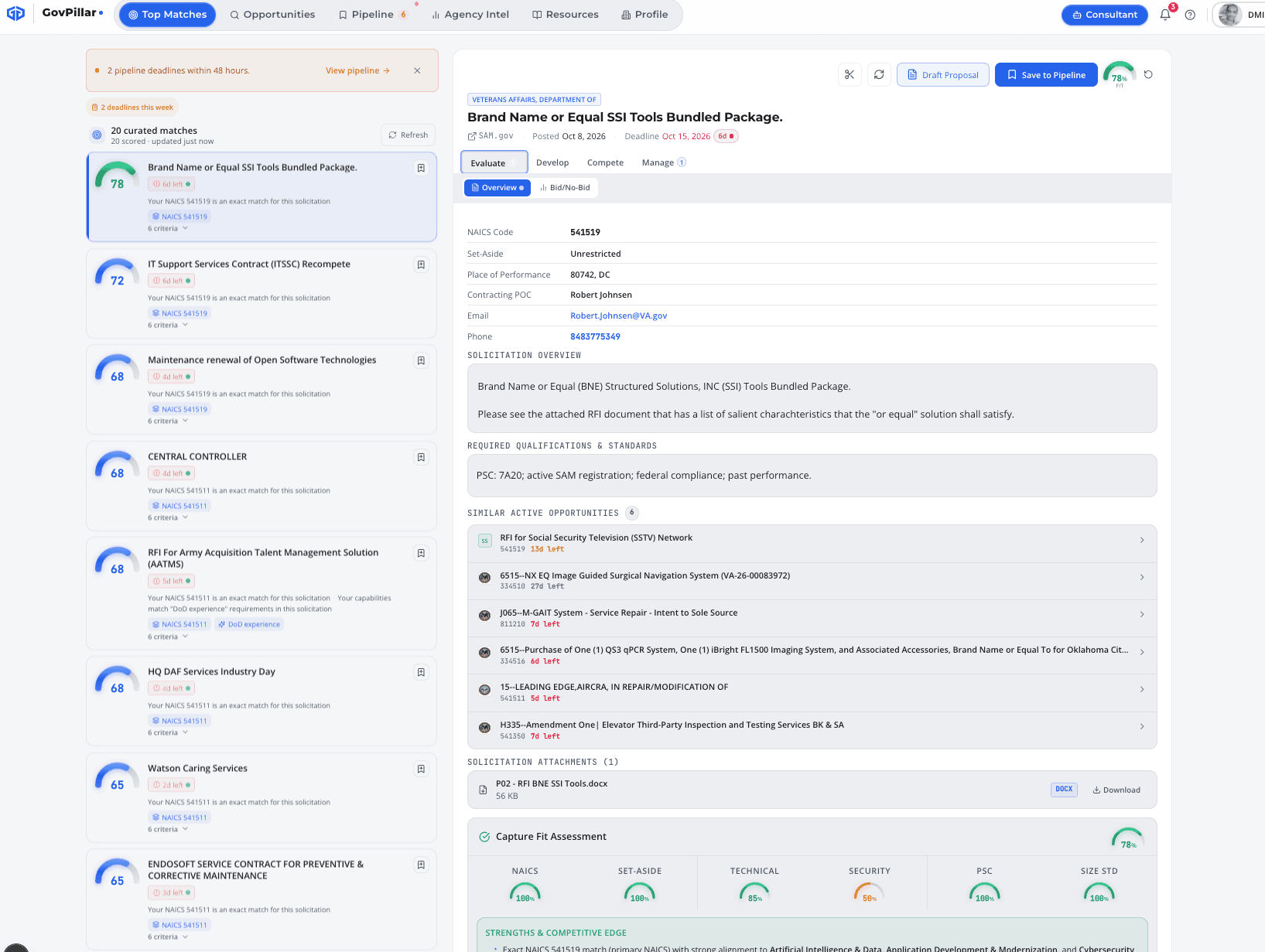
Open any opportunity → Evaluate tab → Score. The score runs against your company profile and comes back in about 15 seconds. Scores are saved — they don't re-run unless you ask.
| Dimension | What it checks |
|---|---|
| NAICS Fit | How close the solicitation NAICS is to your primary and secondary codes |
| Set-Aside Fit | Whether you hold the required certification — 8(a), HUBZone, SDVOSB, WOSB |
| Technical Fit | How well your capability statement and past performance match the requirements |
| Security Fit | Whether your clearance level covers what the solicitation requires |
| PSC Fit | Whether the Product/Service Code aligns with your work categories |
| Size Standard Fit | Whether your company size falls within the SBA threshold for this NAICS |
The output includes an overall score (0–100), per-dimension scores, a list of strengths and gaps, and a short strategy section with the most important things to address before bidding.
Re-score after updating your profile
If you add past performance or change NAICS codes, re-run scoring on your pipeline items. In the Pipeline tab, select multiple items and use Score All.
RFP Shredder
Paste a SAM.gov URL or the solicitation text directly, and the RFP Shredder pulls out the structured requirements. Open the Develop tab on any opportunity to find it.
- SAM.gov URL — GovPillar fetches the document and parses it
- Paste text — useful for attached SOW or PWS files that aren't in SAM.gov
Output: Section L (submission instructions) with page limits and mandatory flags; Section M (evaluation factors) with weights; FAR/DFARS clauses flagged by risk level.
| Clause | What it means for you |
|---|---|
| CMMC 2.0 | Cybersecurity certification required at Level 1, 2, or 3 |
| Buy American Act | Domestic content requirements — affects product sourcing |
| Section 889 | Bars Huawei, ZTE, and other covered equipment from your supply chain |
| ITAR/EAR | Export control — affects who can work on the contract |
| CUI | Controlled Unclassified Information handling — requires specific safeguards |
| E-Verify | All employees must be verified through E-Verify |
Push to Compliance Matrix
After extraction, click Push to Compliance Matrix. It pre-populates the tracking table with every Section L requirement — no manual entry.
Compliance Matrix
A table that maps each RFP requirement to a response owner, status, and action plan. Lives in the Develop tab. Most teams populate it from the RFP Shredder, then manage it through proposal development.
| Column | What to put here |
|---|---|
| Requirement | The RFP requirement text — from Section L, M, or added manually |
| FAR Reference | The clause or section number from the solicitation |
| Response Owner | The person responsible for writing the compliant response |
| Status | Compliant / Partial / Gap / Review |
| Action Plan | What needs to happen to address this requirement |
Click any cell to edit. Everything saves automatically. Add rows with + Add Row, or push them in bulk from the RFP Shredder.
Bid Roadmap
A capture checklist built from the solicitation — tasks grouped into six areas. Click Generate Checklist in the Develop tab to create it.
- Compliance — certifications, FAR clauses, size standard eligibility
- Writing — executive summary, technical approach, past performance
- Pricing — cost model, labor rates, fee calculation
- Teaming — teaming partners, agreements, work-share split
- Submission — volume packaging, portal access, file format validation
- Review — Pink Team, Red Team, Gold Team gates
Each task has a priority (High/Medium/Low), due date, and owner. Assign tasks to teammates directly from the roadmap.
Bid/No-Bid Scorecard
A structured decision framework based on the Shipley method. Score five dimensions 1–10 and get a weighted recommendation. Find it in the Compete tab.
| Score range | What it means |
|---|---|
| 70–100 | Pursue — strong fit across most dimensions |
| 40–69 | Conditional — worth pursuing if you can close the gaps |
| 0–39 | Pass — the resource cost isn't justified by the win probability |
Export a one-page Decision Brief PDF (with signature blocks) via Export Decision Brief — useful for getting sign-off from leadership.
Competitor Intelligence
The Compete tab pulls incumbent and competitor data from FPDS. Click Run Competitor Analysis to generate it.
- Incumbent contractor — name, contract number, award date, and expiration
- Vulnerability score — based on how close they are to expiration and any performance flags
- Ghosting strategy — positioning angles to differentiate against the incumbent's weaknesses
AI Consultant — Plan Mode
Plan mode lets the AI work through a multi-step capture goal without you driving each step. Open the Consultant panel, switch to Plan, and describe what you want done.
Example: "Score this opportunity, build a compliance matrix from the attached SOW, and generate a capture checklist." The AI fetches documents, runs scoring, extracts requirements, and builds the checklist in sequence.
Nothing saves without your approval
Every write action — saving a checklist, adding matrix rows, drafting a document — stops and shows you what it's about to do. Click Approve to confirm or dismiss to skip.
AI Consultant — Chat Mode
Chat mode is free-form. The AI has the full solicitation text, your company profile, and all the capture data you've built for this pursuit. Press A to open the panel from any tab.
- "What are our three biggest gaps on this RFP?"
- "Draft an executive summary for the technical volume"
- "Who is the likely incumbent and when does their contract expire?"
- "Which GSA CALC labor categories match the key personnel requirements?"
- "We're 8(a) — how should we position against an unrestricted incumbent?"
Was this page helpful?